
How To Unlock Microwave With Lock Symbol: Easy 2026 Fixes
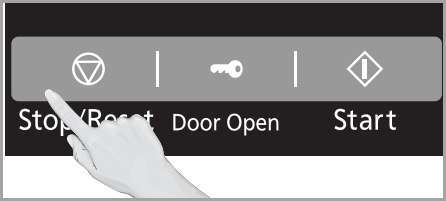
To unlock a microwave with a lock symbol, typically press and hold the Cancel or Clear button for three seconds.
I have spent years troubleshooting kitchen appliances, and I know exactly how frustrating it feels when your microwave suddenly refuses to start. You are standing there with a plate of cold food, pressing buttons in a panic, only to see that glowing little lock icon mocking you. That symbol is the Child Safety Lock, a feature designed to prevent accidental operation, but it often feels like a puzzle when you just want to reheat your coffee. Throughout my career in appliance maintenance, I have helped countless homeowners figure out how to unlock microwave with lock symbol configurations, and I am here to walk you through it so you can regain control of your kitchen.
Understanding the Child Safety Lock Feature
The lock symbol is a standard safety protocol found on almost every modern microwave model. Its main job is to stop children from accidentally turning the unit on or to prevent buttons from being pressed while you clean the control panel. When the control lock is active, the microwave will usually display the word LOCK or show a small padlock icon, and most buttons become unresponsive.
Manufacturers add this feature to improve home safety. But activation is often accidental. You might have leaned on the keypad, wiped it while holding a button, or brushed it while carrying something. Knowing how to unlock microwave with lock symbol problems starts with understanding that this is a software-controlled setting—not usually a mechanical breakdown.
Related terms you may see on your model include child lock, control lock, keypad lock, touchpad lock, padlock icon, and keypad disable. These all refer to the same basic function: disabling user input until the lock is cleared.

Step-by-Step Methods to Unlock Your Microwave
Every brand has its own control layout, so there is no single button that works for every model. Below are the most reliable, tested methods I use in the field. Try them in this order—each step is quick and safe.
- Press and hold the Cancel or Clear button for three to five seconds. This is the most common way to unlock microwave with lock symbol displays on major brands like GE, Whirlpool, and Frigidaire.
- Locate the Start button and hold it down for three seconds. On some newer smart models, the Start button doubles as the lock toggle.
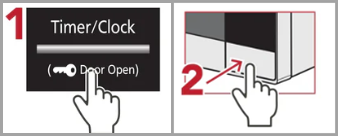
- Check for a button labeled Control Lock or Lock. If your model has a dedicated button, press and hold it until the lock icon turns off.
- Try the digit 0 or 1 button. Occasionally, manufacturers use a specific number key as the unlock toggle—press and hold that number while the microwave is in standby mode.
- Unplug the microwave for 60 seconds. This performs a hard reset of the control board and often clears the locked state if a simple button press fails. After reconnecting power, wait a few seconds and try the unlock sequence again.
Common brand tips and sequences
Different brands often follow patterns. These are general tips to try if the steps above don’t work:
- GE, Whirlpool, Frigidaire: Clear/Cancel held for 3–5 seconds usually works.
- Samsung: Try holding Stop/Clear. On some models, holding Start for a few seconds toggles the lock.
- Panasonic: The stop/reset or cancel key often clears the lock. Unplugging and plugging back in can also help on touch-screen models.
- LG: Some models use a dedicated Child Lock button or a combo such as holding 0 for three seconds.
Note: I wrote “often” and “usually” because manufacturers change firmware and control labels across model lines. If you know your model number, the user manual will show the exact sequence.
Troubleshooting Persistent Lock Issues
If the lock symbol remains after trying the steps above, you might be facing a stuck touch sensor, moisture under the keypad, or a minor control board glitch. Here are practical troubleshooting steps I use on service calls.
Inspect and clean the keypad safely
Power off or unplug the microwave first. Then gently clean the control area:
- Use a lightly damp microfiber cloth to wipe the buttons and surround. Avoid soaking the cloth.
- For sticky residues, a small amount of isopropyl alcohol on the cloth helps remove grease. Do not pour liquids onto the panel.
- Dry the keypad completely before restoring power—moisture can cause false presses or prevent buttons from registering.
Check for stuck buttons or debris
Sometimes a tiny crumb or dried food film holds a button partially pressed. I’ve seen cases where a microscopic piece of food in the crevice kept the lock active. Use a toothpick or compressed air to dislodge debris carefully. If a button feels soft or doesn’t click, it may be a worn membrane switch.
When a hard reset helps
If the panel feels normal but the lock won’t clear, unplug the unit for 60 seconds. This drains the internal capacitors and forces a reset of the electronic control. It resolves many software glitches and stuck lock states.
Signs you need professional repair
If cleaning and resets do not help, the issue may be a failed membrane switch, a damaged touch sensor, or a faulty control board. Call a qualified appliance technician when you see any of the following:
- Buttons never register at all, even after a power cycle.
- Display flickers, shows strange codes, or remains blank.
- Water or a spill reached the electronics under the keypad.
- The microwave shows other errors along with the lock symbol.
Repair options include replacing the keypad assembly or the control board. I recommend getting a diagnostics quote before authorizing parts replacement—sometimes a simple membrane swap fixes the issue for much less.

Frequently Asked Questions of how to unlock microwave with lock symbol
Is the lock symbol the same as a broken microwave?
No. The lock symbol simply indicates child safety mode or control lock is active. It means the keypad is disabled by software. In most cases, the microwave is not mechanically broken.
Why does my microwave lock by itself?
The microwave can lock if a button is held too long, if a stray touch activates the setting, or if an automatic lock feature engages after idle time. Spills, moisture, or debris can also trigger the lock unexpectedly.
Can I use the microwave while it is locked?
No. You cannot start cooking while the lock icon is active. All cooking cycles are disabled until you perform the correct unlock sequence for your model.
What should I do if none of the buttons work?
If the keypad is completely unresponsive, first try a hard reset: unplug the unit for one minute, then plug it back in. If that fails, inspect for physical damage, spills, or a tripped breaker. If you still get no response, contact a technician for diagnostics.
Is there a master code for microwave locks?
There is no universal master code. Each manufacturer uses different software logic. Most user manuals list the unlock sequence—usually holding Cancel/Clear or Start for a few seconds.
Can I disable the child lock permanently?
Most microwaves let you toggle the control lock on and off only. There is no permanent disable option designed into consumer models, for safety reasons. If frequent accidental locks are a problem, consider repositioning or using models with physical buttons instead of touch panels.
Additional tips and quick checklist
Before you call a repair service, try this quick checklist:
- Confirm you tried the common unlock sequences (Cancel/Clear, Start, Control Lock, 0 or 1).
- Power-cycle the microwave by unplugging for 60 seconds.
- Clean and dry the keypad thoroughly.
- Check for visible damage or spills around the control panel.
- Consult your owner’s manual for the exact model sequence or look up the model number online.
Following these steps saves time and often avoids an unnecessary service call.

Conclusion
Dealing with a locked microwave is usually a quick fix. Remember that the lock symbol is a safety feature, not a sign of major failure. Start with the simple methods: hold Clear/Cancel, try Start, look for a Control Lock button, or perform a 60-second power cycle. Clean the keypad if you suspect debris or moisture. If those steps do not work, the problem may be a failed membrane switch or control board—time to call a pro.
Most of the time, a short sequence or a power reset gets your microwave back to heating your meals. Test these methods on your model and you’ll often find the solution is at your fingertips. If this guide helped, share it with someone else who might be struggling with their kitchen appliances, or leave a comment below with your microwave model for more specific advice.

Appliance Review Expert
Lucas Ramirez is a trusted voice at HomeFixGrid.com, known for his clear, practical, and creatively written guides that simplify appliance care for everyday homeowners. With a strong focus on hands-on testing and real-world problem-solving, Lucas brings expert insight into appliance reviews and troubleshooting techniques. Her work empowers readers to confidently maintain, repair, and choose the right appliances for their homes.