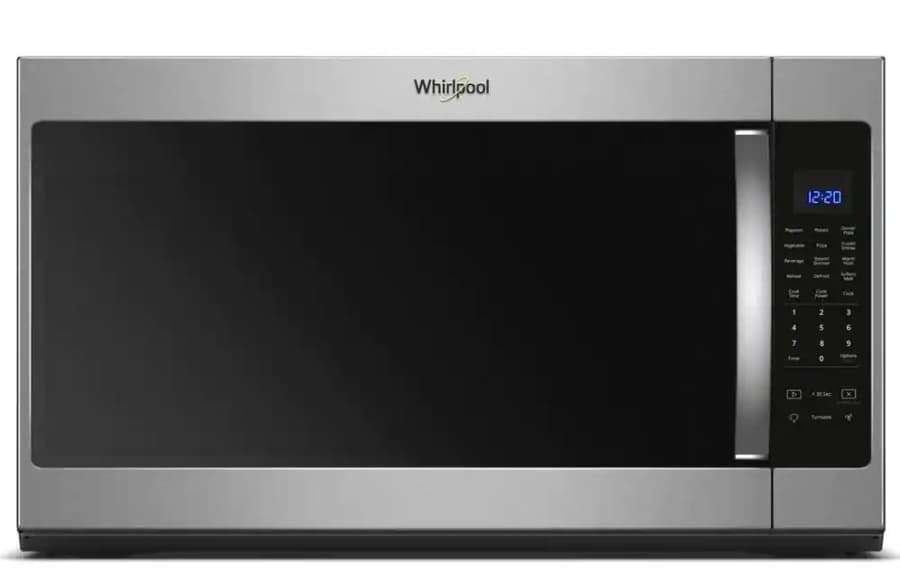
How To Turn Off Whirlpool Microwave Fan: Easy Steps
On most Whirlpool over-the-range microwaves in the United States, press the Vent Fan, Fan, or Exhaust Fan button until the display shows Off. Some models use a Fan Speed button that cycles through High, Low, and Off.
If the fan will not stop, the microwave may have turned it on automatically to cool the cooktop area. In that case, the fan may keep running until the unit cools down.

What the Whirlpool microwave fan does
A Whirlpool over-the-range microwave may have more than one fan. Knowing which fan you hear can save time.


The vent fan pulls cooking smoke, steam, and odors from the range below. It sends the air through a filter and, in some kitchen setups, outdoors through ductwork.
The microwave also has an internal cooling fan. This fan helps protect the microwave’s parts from heat during cooking and may run while, or briefly after, the microwave operates. The vent fan button may not control this internal fan.
The fan types at a glance
| Fan you hear | Main purpose | Usually controlled by |
|---|---|---|
| Vent or exhaust fan | Removes heat, steam, and cooking odors | Vent Fan or Fan Speed button |
| Internal cooling fan | Protects microwave parts from heat | Automatic microwave controls |
| Automatic heat fan | Cools the area above the range | Temperature sensor and control board |
The exact button name depends on the Whirlpool model. Whirlpool publishes owner manuals and use-and-care guides through its official appliance support page.
How to turn off the Whirlpool microwave vent fan
Use the following steps while the microwave is not actively cooking.
-
Find the Vent Fan, Fan, or Exhaust Fan button.
Look near the bottom or side of the control panel. -
Press the button once.
On some Whirlpool models, one press turns the fan on at high speed. -
Press it again to change the speed.
The fan may move from High to Low. -
Press the button again until the fan turns off.
Some displays show OFF. Others simply stop the fan. -
Wait a few seconds and listen.
The fan may take a short time to stop. If it keeps running, the automatic heat feature may be active.
Some models use separate Fan Speed and Fan Timer controls. If your microwave has a Fan Timer button, press it and use the number pad or arrow keys to set the remaining time to zero, if the manual allows it.
If your model has a fan timer
A timer lets the vent fan run for a set period after cooking. To cancel it:


- Press Fan Timer.
- Press Cancel, Off, or the control shown in the display.
- If needed, press Vent Fan until the display shows Off.
The button sequence is not the same on every Whirlpool microwave. Use the model number to find the correct manual if these steps do not match your control panel.

Why the Whirlpool fan turns on by itself
The fan may turn on automatically when the microwave detects too much heat near the cooktop. This can happen when you use a large pan, a high burner setting, or several burners at once.
The automatic fan is a protective feature. It helps reduce heat around the microwave’s control area and other parts mounted above the range.
When this happens, pressing the Vent Fan button may not turn the fan off right away. The control may keep the fan running until the temperature drops to a safe level.
What to do when the fan starts automatically
- Turn off the range burners.
- Move hot pans away from the area directly below the microwave, if it is safe to do so.
- Leave the microwave door closed unless you need to remove food.
- Allow the fan to run while the area cools.
- Try the Vent Fan button again after the microwave and cooktop are cooler.
Do not cover the microwave’s lower vents or place objects over them. Blocked airflow can cause more heat to build up.
What to do if the fan will not turn off
A fan that keeps running does not always mean the microwave is broken. Check the likely causes in this order.
1. The cooktop is still hot
This is the most common reason for an automatic fan that will not stop. Let the range and the area below the microwave cool fully.
2. The fan timer is active
Look for a timer symbol, a countdown, or a message related to the fan. Cancel the timer using the controls listed in your model’s manual.
3. You are pressing the wrong control
The Cancel button may stop microwave cooking without stopping the vent fan. The light button controls the cooktop light, not the fan. Find the button labeled Vent Fan, Fan, or Exhaust Fan.
4. The fan is the internal cooling fan
If the sound comes from inside the microwave and continues after cooking, it may be the cooling fan. It may stop on its own after the unit cools.
Do not remove the microwave cabinet to reach the fan. Microwave ovens contain high-voltage parts that can remain dangerous even after the appliance is unplugged.
5. The control panel is not responding
If the buttons do not work:
- Stop microwave cooking.
- Unplug the unit only if you can do so safely, or switch off its circuit breaker.
- Wait at least one minute.
- Restore power.
- Test the Vent Fan button again.
If the fan immediately starts again when the range is cool, or if the controls remain unresponsive, arrange service through Whirlpool or a qualified appliance technician.


Whirlpool fan controls by common symptom
| What you notice | Likely cause | Best next step |
|---|---|---|
| Fan runs at high speed after pressing one button | Normal fan setting | Press the fan button again to cycle to Off |
| Fan switches from high to low but does not stop | More button presses are needed | Continue cycling through the settings |
| Fan starts while cooking on the range | Automatic heat protection | Turn off the burners and let the area cool |
| Fan runs after microwave cooking ends | Internal cooling or fan timer | Wait, then check the fan timer |
| Fan runs even when the microwave is cold | Control issue or sensor fault | Reset power and arrange service if it continues |
| Buttons do not respond | Control lock or electronic issue | Check the manual, reset power, and seek service if needed |
Common mistakes to avoid
Do not unplug the microwave while it is cooking
Stopping power suddenly can interrupt the cooking cycle and may leave the appliance in an unclear state. Press Cancel first, then disconnect power only when troubleshooting a control problem.
Do not block the vent openings
A towel, storage item, or decorative cover can restrict airflow. Keep the vents clear as described in the Whirlpool installation and use instructions.
Do not assume every fan noise is the exhaust fan
The vent fan removes air from the cooking area. The internal cooling fan protects microwave parts. They can sound similar, but the controls may affect only one of them.
Do not keep resetting the appliance
A power reset can clear a temporary control problem. It will not repair a faulty temperature sensor, motor, relay, or control board. Repeated resets are not a substitute for service.
Do not remove the outer cover
Only a trained technician should open the microwave cabinet. The high-voltage capacitor and related components can present a serious shock hazard.
How to find the correct Whirlpool instructions
The model number gives you the most reliable answer because Whirlpool uses different control layouts across microwave models.
Look for the model label:
- Inside the microwave cavity, along the door frame
- On the front or side of the cabinet
- On a label visible when the door is open
- In the original installation or ownership documents
Enter that model number on Whirlpool’s product support and manuals page. Search the Use and Care Guide, Owner’s Manual, or Control Guide for terms such as:
- Vent Fan
- Exhaust Fan
- Fan Speed
- Fan Timer
- Automatic Fan
- Cooktop Overheating
The manual is especially useful when the control panel has no button clearly labeled “Off.”
When to call for appliance service
Contact Whirlpool support or a qualified appliance technician if:
- The fan runs continuously after the microwave and cooktop are cold.
- The fan runs at only one speed when the controls should change it.
- The fan makes scraping, grinding, buzzing, or rattling sounds.
- The control panel smells hot or shows signs of melting.
- The microwave displays an error code.
- The fan will not stop after a safe power reset.
- The microwave has smoke, sparks, or signs of electrical damage.
If you see smoke or smell burning insulation, stop using the appliance and disconnect power only if you can do so without touching damaged wiring or hot parts.
Frequently asked questions
Does the Cancel button turn off the Whirlpool microwave fan?
Usually, no. Cancel generally stops microwave cooking, while the Vent Fan or Fan Speed button controls the exhaust fan. The exact behavior depends on the model.
How long does the Whirlpool microwave fan run after cooking?
There is no single time that applies to every model. The fan may stop after a timer ends, after the internal parts cool, or after the cooktop area reaches a lower temperature.
Why does the fan turn on when I use the stove?
The microwave may sense high heat rising from the range. It turns on the fan to protect the microwave and reduce heat around the control area.


Can I turn off the automatic heat fan?
You may be able to turn off the normal vent fan, but some Whirlpool models keep the automatic heat fan on until the temperature drops. Do not force it off by blocking the vents or disconnecting wires.
Why is my Whirlpool microwave fan loud?
A high-speed setting, grease buildup, a dirty filter, loose ductwork, or a worn fan motor can cause extra noise. Clean the filter as directed in the owner’s manual. If the sound is new, harsh, or mechanical, have the unit inspected.
Conclusion
To turn off a Whirlpool microwave fan, press Vent Fan, Fan, or Fan Speed until the fan reaches Off. If it keeps running, turn off the range and wait for the microwave area to cool. A fan that continues to run when the appliance is cool may need a model-specific reset or professional service.
Use your Whirlpool model number and owner’s manual when the button sequence differs. Do not open the microwave cabinet or bypass the automatic fan, because microwave components can remain hazardous even when the appliance is not running.

Appliance Review Expert
Lucas Ramirez is a trusted voice at HomeFixGrid.com, known for his clear, practical, and creatively written guides that simplify appliance care for everyday homeowners. With a strong focus on hands-on testing and real-world problem-solving, Lucas brings expert insight into appliance reviews and troubleshooting techniques. Her work empowers readers to confidently maintain, repair, and choose the right appliances for their homes.