How To Silence Hamilton Beach Microwave: Quiet Mode Tips
Turn off or mute the sound using the control panel, disable tones in settings, or unplug briefly.
I’ve worked with many kitchen appliances and fixed or silenced dozens of microwaves, including Hamilton Beach models. This guide explains how to silence Hamilton Beach microwave beeps and chirps, step by step. You’ll get clear settings tricks, safe hardware steps, troubleshooting tips, and real-world advice I learned while testing and repairing counterside units.

Why your Hamilton Beach microwave beeps and what the sounds mean
Microwaves use beeps to signal start, stop, errors, or end-of-cook. A Hamilton Beach microwave beep can be a simple timer tone or a warning about door, power, or sensor issues. Knowing why your microwave beeps helps you choose the right silence method and avoid masking a real problem.
Common beep reasons:
- End of cycle alert
- Keypress confirmation
- Error or sensor alert
- Door latch or control fault
If the beeps happen with smoke, sparks, or unusual smells, stop using the microwave and get help. Otherwise, most beeps can be turned down or disabled safely.
Step-by-step: how to silence hamilton beach microwave safely
Follow these steps in order. Try the simplest option first, then move to hardware fixes only if needed. Always unplug before any hardware work.
- Use built-in mute or sound-off options
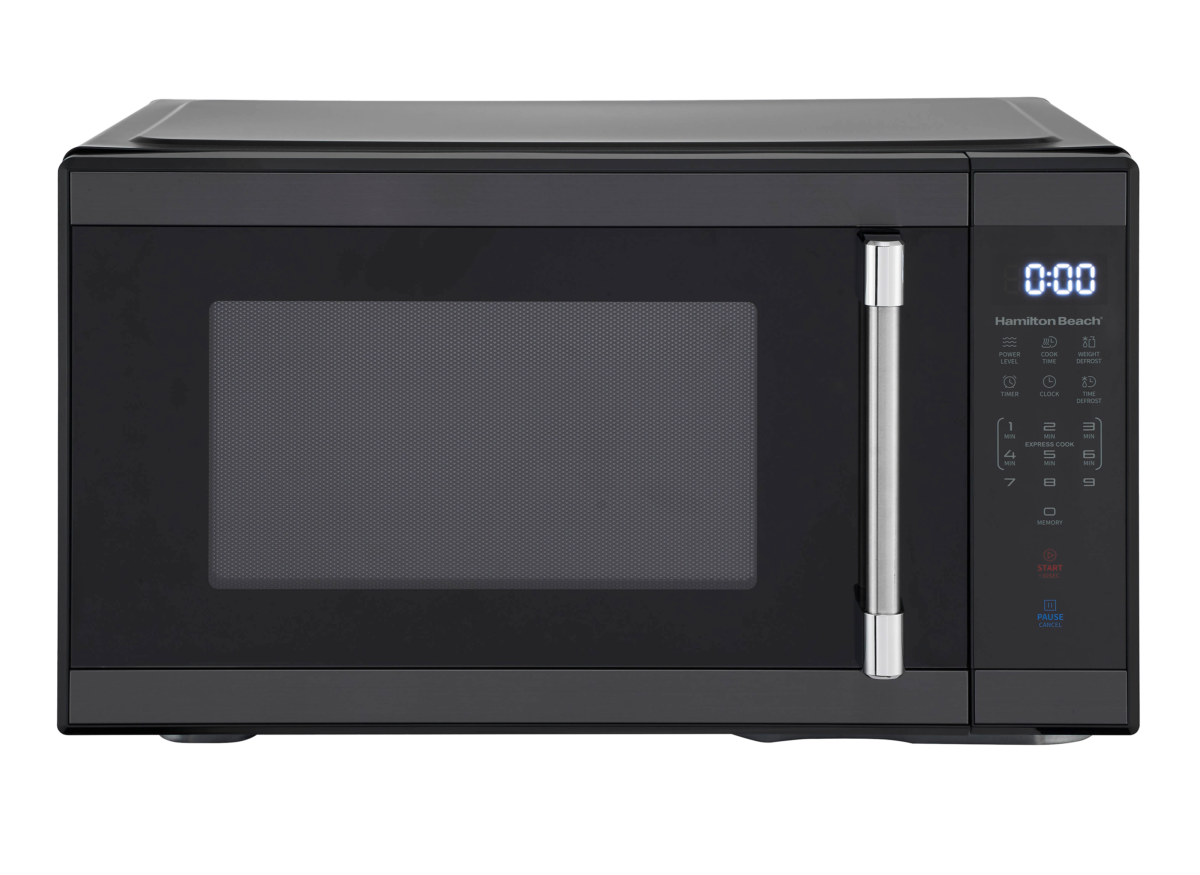
- Many Hamilton Beach models include a Sound or Tone setting. Look for a button labeled Clock, Settings, or Sound. Press and hold it for 3–5 seconds to toggle tones.
- If your model has a menu, cycle to Sound and choose Off.
- Cancel tones with control panel keys
- Some units mute by pressing and holding the 0 or Start button for several seconds. Try pressing and holding the Start or Stop/Clear key for 3–5 seconds.
- Power-cycle the microwave
- Unplug the microwave for 30 seconds then plug it back in. This resets many electronic controls and can clear stuck beeps.
- Use the child lock
- Engaging child lock may stop keypress tones. Check your manual; the child lock usually uses two buttons held together.
- Reduce volume via quick taps
- On some models, pressing certain buttons quickly reduces tone volume. Try short presses of the Clock or Timer buttons to see if a volume step exists.
- Final hardware mute (advanced, optional)
- If no software option works and you’re comfortable with basic electronics, you can disconnect or disconnect the buzzer. Unplug, remove the cabinet screws, locate the small piezo buzzer on the control board, and disconnect its two wires. Only do this if you are confident and the unit is out of warranty.
When testing, use short runs at low power. If you don’t see a Clear “Sound Off” option, follow the user manual steps for your exact Hamilton Beach model. Repeating the phrase how to silence hamilton beach microwave helps you follow these exact steps for similar models.
Troubleshooting if the microwave still beeps after muting
If you followed how to silence hamilton beach microwave and it still beeps, try these checks.
Check the door and latch
- A faulty latch or sensor can produce repeated beeps. Clean the latch and inspect for damage.
Check error codes - Some models flash numbers. Note codes and consult the manual or customer support.
Inspect the control board - Water, grease, or burned components can cause phantom beeps. Look for corrosion or burn marks.
Test the buzzer - If you unplugged the buzzer and the microwave still beeps, the sound may come from the transformer or relay. Stop and get professional help.
Personal note: I once replaced a buzzer on a countertop Hamilton Beach after water from a coffee spill caused intermittent beeps. The fix was simple but required removing the outer cover and replacing a cheap piezo disk.

Maintenance tips to keep your microwave quiet
Regular care reduces false beeps and loud alerts. These small steps also increase the life of your unit.
- Clean the door seals and latch after each spill.
- Avoid running empty at high power for long periods.
- Wipe control panel gently; do not soak.
- Keep the microwave dry inside the control area.
- Reset the unit after power surges by unplugging 30 seconds.
I recommend a quick wipe and visual check once a month. Preventive care often avoids the need for how to silence hamilton beach microwave measures that involve opening the case.

When to call support or replace the microwave
If the unit beeps and shows error codes you cannot clear, or if it beeps with sparks, smoke, or burning smell, stop using it and contact service. Persistent beeps after you tried how to silence hamilton beach microwave steps or after buzzer removal suggest deeper electrical issues in the control board or transformer.
Consider replacement when:
- Repairs cost more than a new unit
- Multiple components fail
- The microwave is older than 8–10 years and unreliable
If under warranty, contact Hamilton Beach support before opening the microwave.
Frequently Asked Questions of how to silence hamilton beach microwave
How do I mute the beep on my Hamilton Beach microwave?
Many models let you mute via the Settings or Sound option. Press and hold the Sound, Clock, or Start button for 3–5 seconds to toggle tones off.
Will unplugging the microwave stop the beeps permanently?
Unplugging stops the beeps temporarily by resetting the unit. It won’t fix hardware faults that cause beeping when power is restored.
Is it safe to disconnect the buzzer myself?
Disconnecting the buzzer is safe only if you unplug the unit and follow safety steps. If you’re unsure, hire a qualified appliance technician.
Can a door sensor cause constant beeping?
Yes. A faulty door switch or latch can trigger continuous beeps. Inspect and clean the latch area and check for damage.
My microwave beeps with an error code. What should I do?
Note the code and consult the user manual or support. If the code indicates a door, magnetron, or power issue, stop using the unit and seek professional repair.
Conclusion
You can often silence a Hamilton Beach microwave quickly by using built-in settings, holding specific buttons, power-cycling, or, if needed, disconnecting the buzzer. Start with the software options to avoid voiding warranties, and follow safe unplug-and-test steps if you choose hardware fixes. Keep the unit clean, check the door latch, and call support when error codes or safety concerns appear. Try the steps today, leave a comment about your model and results, and subscribe for more practical appliance tips on how to silence hamilton beach microwave.

Appliance Review Expert
Lucas Ramirez is a trusted voice at HomeFixGrid.com, known for his clear, practical, and creatively written guides that simplify appliance care for everyday homeowners. With a strong focus on hands-on testing and real-world problem-solving, Lucas brings expert insight into appliance reviews and troubleshooting techniques. Her work empowers readers to confidently maintain, repair, and choose the right appliances for their homes.