Do Refrigerators Have A Display Mode: How It Works
Yes, many refrigerators have a display mode that lets stores demonstrate features without cooling food.
The answer to “do refrigerators have a display mode” depends on the brand and model. Most modern units include a showroom, demo, or cooling-off mode, while some also offer Sabbath, vacation, or control-lock settings. Knowing the difference can prevent warm food, wasted energy, and an unnecessary service call.
What Is Display Mode on a Refrigerator?
Display mode is a setting made for showrooms, retail stores, and product demonstrations. It allows the lights, screen, water dispenser, and other controls to work while the cooling system stays off.
Manufacturers may call it demo mode, showroom mode, cooling-off mode, or display mode. These names can vary, but the purpose is usually the same: make the refrigerator look active without using full cooling power.
So, do refrigerators have a display mode? Many do, especially smart refrigerators and models with digital control panels. Basic refrigerators may not include this feature.

How Refrigerator Display Mode Works
In display mode, the refrigerator receives power but does not cool in the normal way. The compressor may stay off, and the evaporator fans may not run. However, the interior light, exterior display, sound effects, and dispenser may still operate.
Think of display mode as a movie set. The lights and controls look real, but the main action is not running. This helps stores display a refrigerator without letting it cool an empty cabinet all day.
A refrigerator in display mode may show signs such as:
- The temperature display remains active.
- Interior lights work normally.
- The water dispenser may operate.
- The freezer stays close to room temperature.
- The compressor does not start.
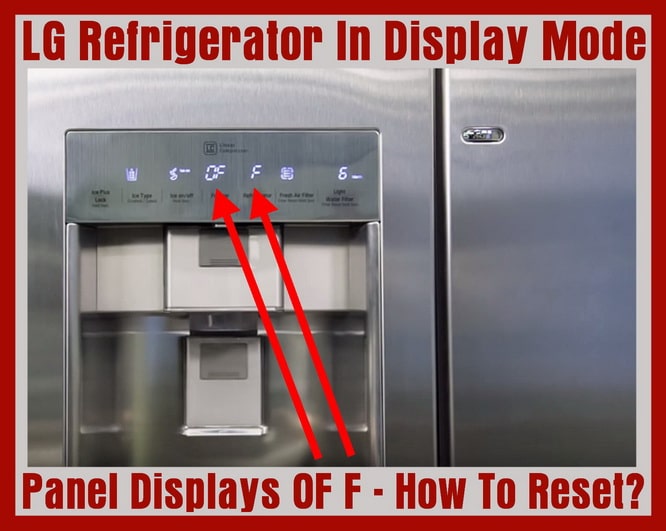
- The display may flash “OF OF,” “O FF,” or “Demo.”
The exact screen message depends on the manufacturer. Some models show no clear message, which can make the problem confusing.

Do Refrigerators Have a Display Mode by Brand?
Most major refrigerator brands offer some form of demo mode, but the controls are not the same. A button combination that works on one model may do nothing on another.
Here are common patterns:
Samsung refrigerators
Samsung models often use a Cooling Off mode. The display may show “OF OF” or “O FF.” This setting turns off cooling but keeps many electronic features working.
LG refrigerators
LG may label the feature Display Mode or Demo Mode. Many models require pressing and holding two buttons at the same time for several seconds.
Whirlpool refrigerators
Whirlpool models often use Cooling Off mode. The control panel may show a message or require a long press on the cooling button.
GE refrigerators
GE models can use Turbo Freeze, Lock, or other controls near the display. Some units have a dedicated cooling-off option, while others use a button combination.
Frigidaire refrigerators
Frigidaire models may include Demo Mode or Showroom Mode. The owner’s manual is the safest way to find the correct activation and reset steps.
Do refrigerators have a display mode on every brand? No. Brand support pages and user manuals are more reliable than general instructions because controls can change between model years.

Why Do Refrigerators Have a Display Mode?
Display mode helps retailers present a refrigerator in an attractive way. A working screen, bright light, and active dispenser can help shoppers understand the product before buying it.
This setting also reduces wear during storage and transport. A refrigerator does not need to run its compressor while sitting in a warehouse or store. Keeping the cooling system off can lower energy use during that period.
Manufacturers also use display mode for demonstrations. A salesperson can show the control panel, door alarm, ice dispenser, or smart features without loading the appliance with food.
The main reasons include:
- Showing product features in a store
- Saving energy during display
- Preventing unnecessary compressor use
- Testing buttons, lights, and dispensers
- Allowing product demonstrations without cooling
This explains why do refrigerators have a display mode in the first place. It is useful before purchase, but it becomes a problem if it remains active after delivery.

How to Tell If Your Refrigerator Is in Display Mode
A refrigerator in display mode often looks normal at first. The screen lights up, and the interior may look clean and bright. The warning signs usually appear when you check the actual temperature.
Use a refrigerator thermometer if possible. The refrigerator section should stay at or below 40°F, and the freezer should reach 0°F for safe food storage. These targets match widely used food safety guidance.
Watch for these clues:
- Food stays warm after several hours.
- Ice cream becomes soft.
- The freezer does not make ice.
- The compressor stays silent.
- The display works, but the cabinet does not cool.
- The screen shows “Demo,” “Showroom,” “Cooling Off,” or “OF OF.”
- The refrigerator has power but no cold air.
A warm refrigerator does not always mean display mode. A blocked vent, failed compressor, dirty condenser, bad fan, or faulty thermostat can cause the same symptoms. Do refrigerators have a display mode that looks like a fault? Yes, and that is why checking the mode first is sensible.

How to Turn Off Refrigerator Display Mode
The reset process varies by model. Do not use random button combinations for too long, because some controls can activate other settings.
Start with these steps:
- Check the model number inside the refrigerator compartment or on the door frame.
- Find the owner’s manual or the manufacturer’s support page.
- Search for “demo mode,” “display mode,” “showroom mode,” or “cooling off.”
- Follow the exact button instructions.
- Wait several minutes for the compressor to start.
- Place a thermometer inside and confirm that the temperature falls.
Common reset methods include:
- Pressing and holding two temperature buttons together
- Holding the refrigerator and freezer buttons at the same time
- Pressing a Cooling Off button for three to five seconds
- Holding the Power Cool and Power Freeze buttons
- Opening the door and pressing a dedicated mode button
After turning off display mode, cooling may not begin at once. The compressor can take a few minutes to start because of a built-in delay. Do refrigerators have a display mode that resets instantly? Some do, but a short wait is normal.
Never place food inside until the refrigerator reaches a safe temperature. If it stays warm after the mode is disabled, unplugging the unit for a few minutes may help, but do not repeatedly power-cycle it. Contact the manufacturer or a qualified appliance technician if cooling does not return.

Display Mode Versus Other Refrigerator Modes
Many refrigerator settings sound similar. Understanding them helps you choose the right option.
Display mode or demo mode
This usually turns cooling off while leaving the controls and lights active. It is mainly for stores and demonstrations.
Vacation mode
Vacation mode usually reduces cooling activity or adjusts the refrigerator section. The freezer may continue operating. It is designed for periods when the appliance is empty or lightly used.
Sabbath mode
Sabbath mode changes how lights, displays, alarms, and automatic functions work. It supports specific religious observances. It does not always turn cooling off.
Energy-saving mode
Energy-saving settings may reduce lighting, screen activity, or cooling intensity. They normally keep the refrigerator cold and should not be confused with display mode.
Control lock
Control lock prevents accidental button presses. It does not usually stop the cooling system.
Do refrigerators have a display mode that is the same as vacation mode? Usually not. These settings have different purposes, so always read the model instructions before changing one.

Is Display Mode Safe for Food?
No. Display mode is not safe for storing perishable food because the refrigerator may not cool at all. Milk, meat, eggs, leftovers, and other foods can enter the danger zone between 40°F and 140°F.
Perishable food should not sit at room temperature for more than two hours. On a hot day, above 90°F, that limit drops to one hour. When in doubt, throw the food away rather than tasting it to check safety.
If you discover display mode after a delivery:
- Move food to another working refrigerator.
- Check the temperature with a thermometer.
- Do not rely only on the screen.
- Discard food that has been warm too long.
- Reset the mode using the manual.
- Call the seller if the appliance was sold as ready to use.
A digital display can be misleading. It may show “37°F” because that is the selected setting, not the actual inside temperature. This is one of the most important lessons when asking, do refrigerators have a display mode.
Benefits and Limits of Refrigerator Display Mode
Display mode has a clear purpose, but it is not useful for everyday storage.
Benefits
- It helps stores demonstrate features.
- It reduces cooling demand while the appliance is empty.
- It lets shoppers test buttons and displays.
- It may reduce compressor operation during transport or storage.
- It gives service staff a simple way to test electronic controls.
Limits
- It does not preserve food.
- It can confuse new owners.
- It may look like a mechanical failure.
- It does not prove that the cooling system works.
- It can remain active after delivery if the installer forgets to disable it.
In my experience with appliance setup problems, the biggest mistake is trusting the display before checking the temperature. A bright screen is like a car dashboard with the engine off: it shows power, but not full operation.

Common Mistakes to Avoid
People often assume a new refrigerator is broken when display mode is active. Others place food inside before checking whether the freezer is making cold air. Both mistakes can lead to spoiled food and needless frustration.
Avoid these errors:
- Do not assume lights mean the refrigerator is cooling.
- Do not ignore “OF OF” or “Cooling Off” messages.
- Do not use instructions for a different model.
- Do not keep opening the doors while waiting for cooling.
- Do not fill the appliance until it reaches the correct temperature.
- Do not remove panels or touch electrical parts to fix a mode setting.
- Do not call for costly repairs before checking demo mode.
A simple thermometer is one of the best tools for refrigerator owners. It gives you a real measurement instead of relying only on the control panel.
When Display Mode Is Not the Problem
If the refrigerator is not cold after you turn off display mode, another issue may be present. Refrigerators need time to cool after installation, especially if they were transported on their side.
Possible causes include:
- The temperature setting is too warm.
- The condenser coils are dirty.
- The air vents are blocked by food.
- The door gasket has a gap.
- The evaporator fan is not working.
- The condenser fan is not working.
- The compressor has failed.
- The refrigerator was recently plugged in.
- The unit needs a control board repair.
Allow several hours for a refrigerator to cool and up to 24 hours for it to reach a stable temperature after installation. Keep the doors closed during this period.
If you hear repeated clicking, smell burning plastic, see water near electrical parts, or notice a damaged power cord, unplug the appliance and seek professional help. Display mode is easy to reset, but electrical and sealed-system repairs require proper training.
How to Check a New Refrigerator After Delivery
A quick inspection can prevent many problems. It also helps you identify whether the appliance arrived in display mode or has a true fault.
Follow this simple process:
- Confirm that the refrigerator is level and has proper clearance.
- Plug it into a suitable grounded outlet.
- Check the screen for demo or cooling-off messages.
- Set the refrigerator near 37°F and the freezer near 0°F.
- Listen for the compressor and fans after the start-up delay.
- Confirm that the interior lights and door seals work.
- Check for cold air after several hours.
- Verify the temperature with an appliance thermometer.
- Wait until the unit is cold before adding food.
- Report problems to the retailer quickly.
Do refrigerators have a display mode that delivery teams should disable? Often, yes. Still, the buyer should verify the setting because installation practices differ between retailers.
Do Smart Refrigerators Have More Than One Display Mode?
Smart refrigerators can have several display-related settings. A touchscreen may enter a screen saver, energy-saving state, control lock, or retail demo mode. These options affect the screen in different ways.
A screen saver only changes what appears on the display. It does not normally stop cooling. Retail demo mode may disable cooling, while control lock prevents changes to temperature settings.
Smart models can also lose connection to a phone app without affecting cooling. A Wi-Fi problem is separate from display mode. Check the physical temperature inside the unit before troubleshooting the app.
The more features a refrigerator has, the more important the manual becomes. Do refrigerators have a display mode that can hide among smart settings? Yes, so look for terms such as Retail Demo, Store Display, Cooling Off, or Demo Mode.
Frequently Asked Questions About Do Refrigerators Have a Display Mode
Do all refrigerators have a display mode?
No, not all refrigerators include this setting. It is more common in modern models with electronic controls, digital displays, and smart features.
How do I know if my refrigerator is in display mode?
Look for messages such as “Demo,” “Showroom,” “Cooling Off,” “OF OF,” or “O FF.” A working display with a warm refrigerator or freezer is another strong clue.
Does display mode use electricity?
Yes, the refrigerator still uses some electricity for lights, controls, and other features. However, it usually uses less power because the compressor and cooling fans are inactive.
Can food stay in a refrigerator during display mode?
No. Display mode may stop the refrigerator from cooling, so perishable food can become unsafe. Move food to a working appliance and check its temperature with a thermometer.
How long does it take for a refrigerator to cool after display mode is turned off?
Many refrigerators begin cooling within a few minutes, but reaching a stable temperature can take several hours. A newly installed unit may need up to 24 hours for full temperature stability.
Is display mode the same as Sabbath mode?
No. Display mode usually turns cooling off for store demonstrations. Sabbath mode changes lights, alarms, and automatic functions for religious observance and may allow normal cooling.
What should I do if my refrigerator stays warm after disabling display mode?
Check the temperature setting, door seal, vents, and power supply first. If the unit remains warm after several hours, contact the manufacturer or a qualified appliance technician.
Conclusion
Many modern refrigerators have a display mode, but the feature may appear under names such as demo mode, showroom mode, or cooling-off mode. It keeps displays and selected features active while stopping normal cooling, which makes it useful in stores but unsafe for food storage.
Check the actual temperature, read the model manual, and disable the mode before adding groceries. If the refrigerator remains warm after the reset, treat it as a possible mechanical problem and seek professional help. Share your refrigerator model or check the manufacturer’s support guide for the exact button sequence and setup advice.

Appliance Review Expert
Lucas Ramirez is a trusted voice at HomeFixGrid.com, known for his clear, practical, and creatively written guides that simplify appliance care for everyday homeowners. With a strong focus on hands-on testing and real-world problem-solving, Lucas brings expert insight into appliance reviews and troubleshooting techniques. Her work empowers readers to confidently maintain, repair, and choose the right appliances for their homes.