What Does A Smart Refrigerator Do: Features And Benefits
Introduction
A smart refrigerator is a connected fridge that uses sensors, software, Wi-Fi, and sometimes cameras to do more than cool food. In a U.S. home, it may help manage groceries, adjust settings, send phone alerts, make ice, track food, and connect with smart-home services.
The basic job stays the same: keep food cold. The “smart” part adds digital tools around that job. Some features work without a subscription, while others need a brand app, cloud service, or compatible smart-home device.

What Is a Smart Refrigerator?
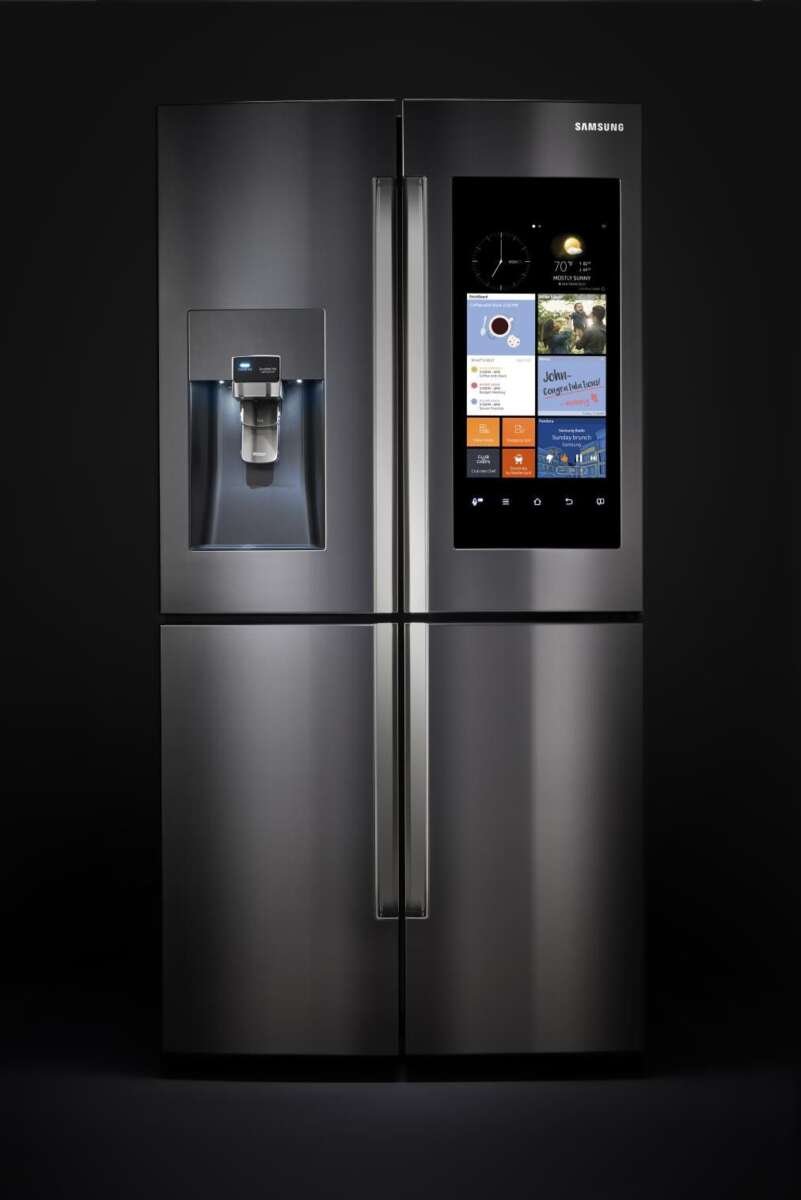
A smart refrigerator is a refrigerator with internet access, built-in sensors, and software. It can share information with a phone app or another device. Many models also have a touch screen, internal cameras, voice control, or automatic diagnostic tools.


A standard refrigerator mainly responds to controls on the door or inside the cabinet. A smart model can also respond to data. For example, it may detect that the door is open, warn about a rise in temperature, or tell you when the water filter needs changing.
Smart refrigerators vary a lot. One model may offer only Wi-Fi alerts and remote temperature control. Another may include cameras, a large display, recipe tools, family calendars, and links to other appliances.
Common smart refrigerator parts
Most smart models use some combination of these parts:
- Temperature sensors: Measure conditions in the fresh-food and freezer sections.
- Door sensors: Detect when a door or drawer is open.
- Wi-Fi hardware: Connects the refrigerator to your home network.
- Mobile app: Lets you view alerts and change selected settings.
- Touch screen: Displays notes, calendars, recipes, music, or food tools.
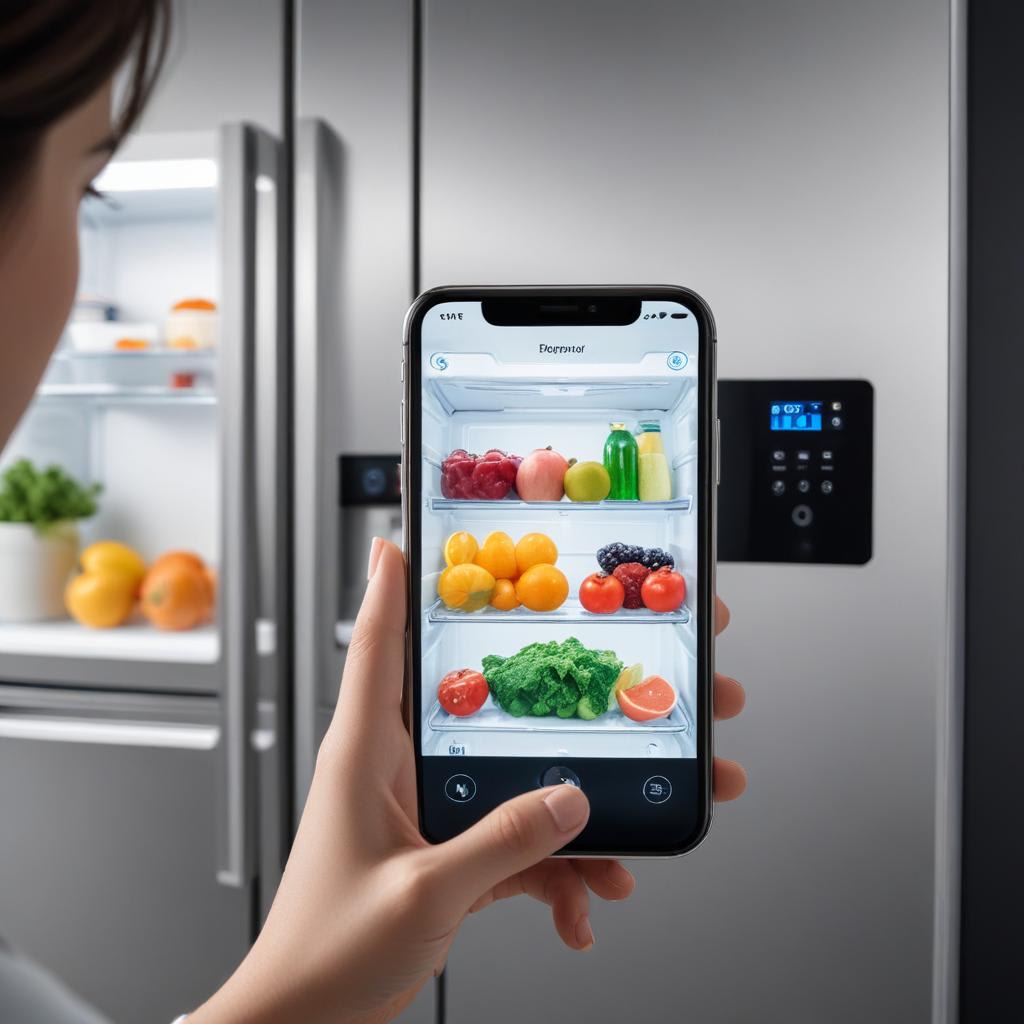
- Cameras: Show some of the contents without opening the door.
- Water and ice sensors: Monitor filters, ice production, or dispenser use.
- Control board: Runs the refrigerator’s software and cooling functions.
The exact feature set depends on the model, software version, and country. A refrigerator sold in the United States may not offer the same features as a similar model sold elsewhere.

What Does a Smart Refrigerator Do?
A smart refrigerator monitors its condition, gives you information, and lets you control some functions from a phone or screen. Its features usually fall into five groups: control, alerts, food management, convenience, and maintenance.
1. It lets you control the refrigerator remotely
A connected refrigerator may let you:
- Change the temperature setting
- Turn on a fast-freeze or fast-cool mode
- Turn ice making on or off
- Check whether a door is open
- Lock selected controls
- View filter status
- Get service or error information
Remote control can help in simple cases. For example, you may turn on a fast-freeze setting before returning from a grocery trip. You may also check the refrigerator after a family member reports that the door may be open.
Remote controls do not replace safe food handling. A phone app may show a setting, but it may not measure the temperature of every item inside the refrigerator.
2. It sends alerts to your phone
Smart refrigerators can send alerts for events such as:
- A door left open
- A high or low temperature
- A water filter that needs replacement
– A power interruption - A failed connection
- An ice maker problem
- A need for routine maintenance
Alerts can reduce the time a problem goes unnoticed. This matters during a long trip or a power outage. Still, alerts depend on power, Wi-Fi, the app, and the refrigerator’s sensors. A disconnected appliance may not send a warning.


3. It may help you manage food
Some smart refrigerators include cameras that take images of the inside. You can view those images in an app while shopping. This can help answer a common question: “Do we already have milk?”
Some systems also let you create shopping lists, mark foods, or enter expiration dates. A few use image recognition to suggest what may be inside. These tools are helpful, but they are not always exact.
A camera may miss food behind other items. It may not know when a package is nearly empty. An expiration reminder may also reflect a date entered by a person or read by software. Treat these tools as aids, not as a food safety system.
4. It may provide a screen for the kitchen
A refrigerator with a front display may support:
- Shared notes
- Digital calendars
- Grocery lists
- Recipes
- Music or video
- Weather information
- Timers
- Family photos
- Smart-home controls
This can put useful information in a busy part of the home. The value depends on how often your household uses the screen. If you already use a phone, tablet, or smart display, the refrigerator screen may add little.
5. It can work with voice assistants and other devices
Some models connect with services such as Amazon Alexa, Google Home, or a brand’s own smart-home system. Depending on the model, you may use voice commands to check settings, manage a list, or control another appliance.
Compatibility changes over time. Check the exact model, app, voice assistant, account type, and region before buying. “Works with smart home” does not mean that every function works with every platform.

How Do Smart Refrigerator Sensors Work?
Smart refrigerators use sensors to collect simple information. Software then turns that information into an alert, display, or action.
A temperature sensor checks the air in one or more areas. A door sensor detects an open or closed position. A water sensor may watch for leaks or track filter use. The control board uses these inputs to manage cooling and other features.
The refrigerator does not “understand” food in the same way a person does. A camera captures an image. Software may compare that image with known patterns. Lighting, packaging, blocked views, and software errors can affect the result.
This creates an important difference:
- A sensor reading is not the same as a full inspection.
- A food label scan is not the same as a food safety check.
- An app status is not always proof that the appliance is working correctly.
For food safety, the U.S. Department of Agriculture recommends keeping a refrigerator at 40°F or below and a freezer at 0°F. Use an appliance thermometer when temperature matters. The built-in display can be useful, but an independent thermometer gives you another check.
A smart refrigerator can help you notice a problem sooner. It cannot make spoiled food safe or replace basic temperature checks.


What Are the Benefits of a Smart Refrigerator?
The main benefit is awareness. A smart refrigerator can tell you about a condition when you are not standing in the kitchen.
Useful benefits for many households
Remote alerts can protect food. A high-temperature warning may prompt you to check the refrigerator after a power failure or door problem.
Shopping can become easier. An inside view or shared grocery list may reduce duplicate purchases.
Maintenance can be simpler. Filter reminders and service alerts can help you remember routine tasks.
Family coordination can improve. A shared screen may display lists, notes, or schedules where everyone can see them.
Accessibility may improve. Remote controls and voice commands can help people who find repeated bending, reaching, or door checks difficult.
Energy use may become easier to monitor. Some models show usage information or provide energy-saving modes. However, the actual energy benefit depends on the appliance, settings, room conditions, and use.
The biggest practical benefit
For many owners, the most useful feature is not the screen. It is the combination of temperature alerts and door alerts. These features address real problems without requiring constant attention.
The best value comes when a feature solves a problem you already have. If your household often leaves a door open, a door alert may be useful. If you rarely use grocery lists or smart-home controls, a large display may not justify a higher price.

What Are the Drawbacks and Limits?
Smart features add parts that a basic refrigerator does not need. That can increase cost, setup time, privacy questions, and possible repair needs.
Higher purchase and repair costs
A refrigerator with a screen, cameras, or advanced controls may cost more than a similar non-connected model. Extra boards, displays, cameras, and sensors may also make repairs more complex.
Check the warranty before buying. Find out whether the warranty covers electronics, labor, ice makers, water systems, and connected features separately.
Dependence on Wi-Fi and cloud services
Many smart functions need an internet connection. If Wi-Fi fails, the refrigerator will often continue cooling, but remote alerts and app features may stop working.
A manufacturer may also change an app, end support for an older model, or require an account for certain tools. Read the product support policy and privacy terms before purchase.


Privacy concerns
Cameras, voice tools, usage data, and household accounts can create privacy issues. Review:
- What data the refrigerator collects
- Whether images leave the appliance
- How long the company stores data
- Which accounts can access the refrigerator
- Whether two-factor authentication is available
- How to delete the account and data
Do not place private notes or sensitive information on a shared refrigerator screen unless the access settings are clear.
Features may become outdated
A refrigerator can last for many years, while apps and software services change more quickly. A screen feature that works today may require a new app or may not be supported indefinitely.
The cooling system should remain useful even if connected features change. Treat smart functions as extras, not as the main reason the refrigerator must work.
Cameras and food recognition are imperfect
Cameras may not see items behind other food. Software may confuse similar packages or fail to recognize a new product. A camera also cannot reliably judge freshness by appearance alone.
Use food labels, storage dates, smell, texture, and safe handling rules. When in doubt about potentially unsafe food, follow USDA guidance rather than relying on the refrigerator app.

How to Set Up a Smart Refrigerator
Set up the refrigerator in this order. The exact steps vary by brand, so use the manual for the model you own.
1. Install the refrigerator safely
Place the refrigerator on a suitable floor with the required clearance. Connect the water line only if the model uses one and the installation instructions allow it. Keep the appliance level and allow it to cool before loading perishable food.
For electrical or water-line work that you cannot perform safely, use a qualified installer. Do not bypass grounding, overload an outlet, or use an unsafe extension cord.
2. Download the official app
Use the official app for the exact brand and model. Check the app store developer name and avoid unofficial downloads.
Create a strong, unique password. Turn on two-factor authentication when available.
3. Connect the refrigerator to Wi-Fi
Use a home network that reaches the kitchen. Some appliances support only certain Wi-Fi bands or security settings. The manual will list the requirements.
If setup fails, try these checks:
- Confirm that the refrigerator is in setup mode.
- Check the Wi-Fi name and password.
- Move the router or use a stronger network signal.
- Update the app and phone software.
- Restart the router and refrigerator if the manual permits it.
- Contact the manufacturer if the model still will not connect.
4. Set temperature alerts
Choose alert levels that are useful but not excessive. Read the manual to learn what the alert measures. Some alerts may detect cabinet temperature, while others may show a setting rather than a direct measurement.
Place a separate appliance thermometer inside the refrigerator and freezer. Confirm that the actual temperature stays within safe limits.
5. Review privacy and account access
Remove old users. Check which phones, accounts, and voice assistants can control the appliance. Install software updates from the manufacturer when they address security or reliability problems.
Signs that setup worked
Setup is complete when:
- The app shows the correct refrigerator
- A test alert reaches your phone
- Temperature settings update correctly
- The refrigerator continues normal cooling
- All household users have the right access
- The app displays the correct filter and ice status

Smart Refrigerator vs. Regular Refrigerator
A regular refrigerator is often the better choice when you want simple cooling, fewer connected parts, and less setup. A smart refrigerator may make sense when alerts, remote access, or food management solve a clear daily need.
| Feature | Smart refrigerator | Regular refrigerator |
|---|---|---|
| Cooling | Yes | Yes |
| Phone alerts | Often available | Usually not |
| Remote settings | Often available | Usually not |
| Built-in cameras | Available on some models | Rare |
| Touch screen | Available on some models | Rare |
| Wi-Fi dependence | Needed for many smart features | Not needed |
| Privacy and account setup | Required for connected tools | Minimal |
| Possible repair complexity | May be higher | Often simpler |
| Upfront price | Often higher | Often lower |
The core cooling performance depends on the specific model, not just whether it has Wi-Fi. Compare temperature control, storage layout, noise, energy use, warranty coverage, and repair support before comparing smart features.
Who may benefit from a smart refrigerator?
A smart model may fit you if:
- You want alerts during travel
- Your household often leaves doors open
- You manage groceries for several people
- You use a connected home system
- You value remote controls
- You need a shared kitchen display
Who may prefer a regular refrigerator?
A regular model may fit you if:
- You want the lowest purchase cost
- You prefer simple controls
- You have weak Wi-Fi near the kitchen
- You do not want an account or app
- You plan to keep the refrigerator for many years
- You want fewer electronic parts

How Much Does a Smart Refrigerator Cost to Own?
The purchase price is only one part of the cost. Also consider installation, water filters, repairs, electricity, and possible subscription fees.
A simple ownership estimate can use this formula:
Estimated total cost = purchase price + installation + filter costs + subscriptions + repairs − rebates
For a hypothetical example, suppose a refrigerator costs $2,500, installation costs $150, filters cost $60 per year for five years, and no subscription is required:
- Purchase: $2,500
- Installation: $150
- Filters: $300
- Five-year total before repairs and electricity: $2,950
This is only an example. Actual costs depend on the model, filter type, local labor rates, warranty, and service plan.
Before you buy, ask:
- Does the app cost money?
- Which features require a subscription?
- How much do replacement filters cost?
- Can the refrigerator work if the company ends cloud support?
- What does the warranty cover?
- Are local repair services available?
- Is the water line included or extra?
Energy use also matters. Look for the yellow EnergyGuide label and the model’s annual energy estimate. Compare similar refrigerator sizes and configurations, since a larger appliance may use more energy even when both models carry an efficiency label.

Common Mistakes to Avoid
Buying the screen instead of the refrigerator
A large display can attract attention, but it does not keep food cold. Start with cooling performance, layout, size, noise, warranty, and service.
Assuming cameras track everything
Camera systems can miss items and misread labels. Use them as a shopping aid, not a complete inventory.
Ignoring offline operation
Ask what still works without Wi-Fi. Cooling should remain the priority. Find out whether temperature controls, ice making, and alerts behave differently when the internet is down.
Skipping independent temperature checks
A smart display may show a target setting rather than the exact temperature of food. Use a refrigerator thermometer, especially after installation, a power outage, or a service visit.
Forgetting filter and water maintenance
A filter reminder does not replace the replacement schedule in the manual. A clogged filter may reduce water flow or affect ice production.
Giving every family member full access
Use separate accounts where possible. Remove access when someone moves out or changes phones.
Connecting the refrigerator to an unsafe network
Keep the appliance on a protected home network. Update its software and change default passwords when the manufacturer requires it.
Key Takeaways
- A smart refrigerator connects cooling functions with software, sensors, apps, and alerts.
- Common features include remote temperature control, door alerts, filter reminders, cameras, shopping lists, and voice control.
- Smart features depend on the exact model, app, Wi-Fi connection, and manufacturer support.
- A smart refrigerator can make grocery planning and problem alerts easier, but it cannot replace safe food handling.
- Use a separate appliance thermometer to check refrigerator and freezer temperatures.
- Compare the full cost of ownership, including filters, subscriptions, installation, repairs, and energy use.
- Choose a smart model only when its connected features solve a real need.
Frequently Asked Questions
Does a smart refrigerator work without Wi-Fi?
Usually, the cooling system still works without Wi-Fi. Basic functions such as cooling and some manual controls may continue. Remote alerts, phone control, cloud services, and some screen features may stop working.
Can a smart refrigerator tell when food is spoiled?
No. A refrigerator may track dates or show camera images, but it cannot reliably confirm that food is safe to eat. Follow USDA food safety guidance and use temperature, storage time, and handling information.
Do smart refrigerators save electricity?
Not automatically. Some models offer energy-saving settings or usage information, but the result depends on the appliance and how you use it. Check the EnergyGuide label and compare similar models.
Do smart refrigerators need a subscription?
Some features may be free, while others may require a paid service. The answer depends on the brand and model. Check the current product page, app terms, and support documents before buying.
Are smart refrigerators secure?
They can be secure when updated and set up with strong account protection, but any connected device can create privacy and security risks. Use unique passwords, enable two-factor authentication when offered, limit account access, and review the manufacturer’s data policy.
Is a smart refrigerator worth it?
It may be worth it if you will use phone alerts, remote controls, food tools, or smart-home integration. If you mainly want dependable cooling at a lower cost, a regular refrigerator may provide better value.
Conclusion
A smart refrigerator is a normal refrigerator with connected tools around it. It can monitor conditions, send alerts, support grocery planning, and give you control from a phone or display.
The best choice depends on your needs, not the number of features. Compare cooling performance, food safety, repair support, privacy, long-term costs, and offline operation before you pay more for smart functions.

Appliance Review Expert
Lucas Ramirez is a trusted voice at HomeFixGrid.com, known for his clear, practical, and creatively written guides that simplify appliance care for everyday homeowners. With a strong focus on hands-on testing and real-world problem-solving, Lucas brings expert insight into appliance reviews and troubleshooting techniques. Her work empowers readers to confidently maintain, repair, and choose the right appliances for their homes.